Chrome extension for visual work

Turn any image into a prompt or text.

Found an image, screenshot, presentation slide, or page section? Pixel2Prompt turns what you see into a clear AI prompt or readable text.

Right-click an image, upload a file, paste a URL, or capture any area of the page. Then copy, translate, and save the result without leaving your browser.

Prompt + visible textTranslate resultsSaved historyOwn AI provider · free mode
creative-board.com/reference
SELECTED AREA
01Prompt ready
02Text found

From visual reference to usable words

See the transformation.

Advertising, beauty, interiors, food, and a screen capture become detailed prompts or editable text you can reuse.

reference_01.jpg
DETAILED PROMPT / 1

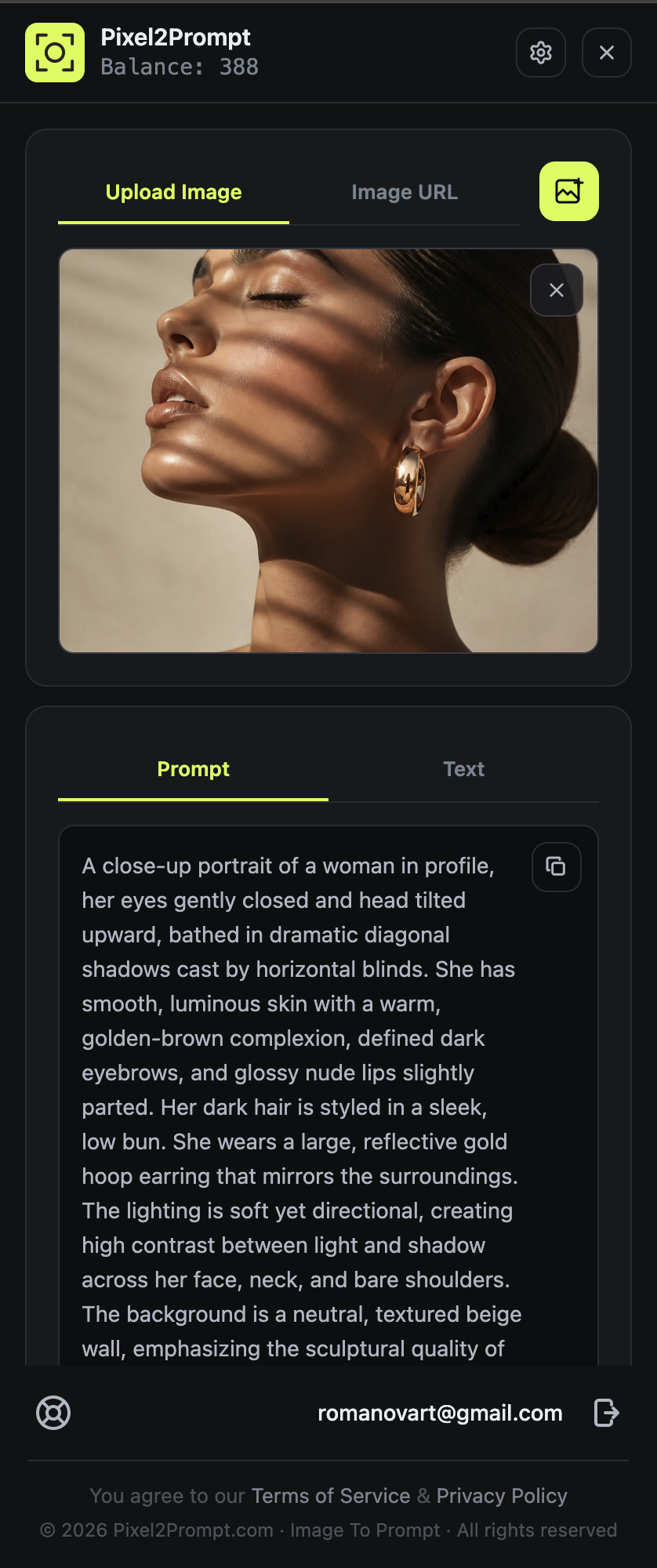
Close-up side-profile beauty portrait of a woman with sleek dark hair in a low bun, eyes gently closed, and a polished gold hoop earring. Warm neutral studio wall, diagonal window-blind shadows, luminous natural skin texture, elegant skincare campaign art direction, calm expression, soft directional sunlight, premium editorial photography.
reference_02.jpg
DETAILED PROMPT / 2

Premium commercial photograph of a modern off-white running sneaker with a graphite sculpted sole and restrained acid-lime lace detail. Clean warm-gray studio, low stone plinth, precise three-quarter product view, crisp softbox lighting, realistic knit texture, energetic sportswear campaign styling, subtle grounded shadow.

reference_03.jpg
DETAILED PROMPT / 3

Luxury skincare campaign still life featuring an amber serum dropper bottle and translucent cosmetic jar on warm travertine. Soft water reflections, fresh green botanical leaf, golden morning light, realistic glass and liquid texture, clean unbranded packaging, refined beauty advertising composition.

reference_04.jpg
DETAILED PROMPT / 4

Sophisticated contemporary living room in a high-rise apartment, sculptural cream sofa, round travertine coffee table, olive accent chair, warm wood wall panels, floor-to-ceiling city window, late-afternoon sunlight, calm architectural magazine photography, balanced wide composition.

reference_05.jpg
DETAILED PROMPT / 5

Elegant editorial food photograph of freshly plated pasta with roasted tomatoes, basil leaves, parmesan, and glossy sauce. Dark stone restaurant table, warm side light, fine steam, rich natural textures, shallow depth of field, premium modern dining campaign, appetizing three-quarter composition.

How great visuals capture attention
Good design makes the message impossible to miss.
08:42 / 12:18CC
reference_06.png
VISIBLE TEXT FROM SCREENSHOT / 6

Extracted text from a screenshot taken during playback: “How great visuals capture attention” and “Good design makes the message impossible to miss.” The image also contains a playback time of 08:42 / 12:18 and a visible captions indicator.

reference_01.jpg
DETAILED PROMPT / 1

Close-up side-profile beauty portrait of a woman with sleek dark hair in a low bun, eyes gently closed, and a polished gold hoop earring. Warm neutral studio wall, diagonal window-blind shadows, luminous natural skin texture, elegant skincare campaign art direction, calm expression, soft directional sunlight, premium editorial photography.

reference_02.jpg
DETAILED PROMPT / 2

Premium commercial photograph of a modern off-white running sneaker with a graphite sculpted sole and restrained acid-lime lace detail. Clean warm-gray studio, low stone plinth, precise three-quarter product view, crisp softbox lighting, realistic knit texture, energetic sportswear campaign styling, subtle grounded shadow.

reference_03.jpg
DETAILED PROMPT / 3

Luxury skincare campaign still life featuring an amber serum dropper bottle and translucent cosmetic jar on warm travertine. Soft water reflections, fresh green botanical leaf, golden morning light, realistic glass and liquid texture, clean unbranded packaging, refined beauty advertising composition.

reference_04.jpg
DETAILED PROMPT / 4

Sophisticated contemporary living room in a high-rise apartment, sculptural cream sofa, round travertine coffee table, olive accent chair, warm wood wall panels, floor-to-ceiling city window, late-afternoon sunlight, calm architectural magazine photography, balanced wide composition.

reference_05.jpg
DETAILED PROMPT / 5

Elegant editorial food photograph of freshly plated pasta with roasted tomatoes, basil leaves, parmesan, and glossy sauce. Dark stone restaurant table, warm side light, fine steam, rich natural textures, shallow depth of field, premium modern dining campaign, appetizing three-quarter composition.

How great visuals capture attention
Good design makes the message impossible to miss.
08:42 / 12:18CC
reference_06.png
VISIBLE TEXT FROM SCREENSHOT / 6

Extracted text from a screenshot taken during playback: “How great visuals capture attention” and “Good design makes the message impossible to miss.” The image also contains a playback time of 08:42 / 12:18 and a visible captions indicator.

Drag the stream · hover a card

A simple workflow

Pick. Capture. Copy.

Use Pixel2Prompt the moment you see something useful and want to turn it into a prompt or editable text.

01

Pick what you see

Choose an image, upload a file, paste an image URL, or capture any area of the page.

02

Capture the exact area

Select only what matters: a photo, poster, interface, screenshot, presentation slide, or text shown on screen.

03

Get a prompt or text

Pixel2Prompt returns a visual description, the visible words, or both from one capture.

04

Copy, translate, save

Use the result right away, translate it, or keep it in your history for later.

image-reference.jpg
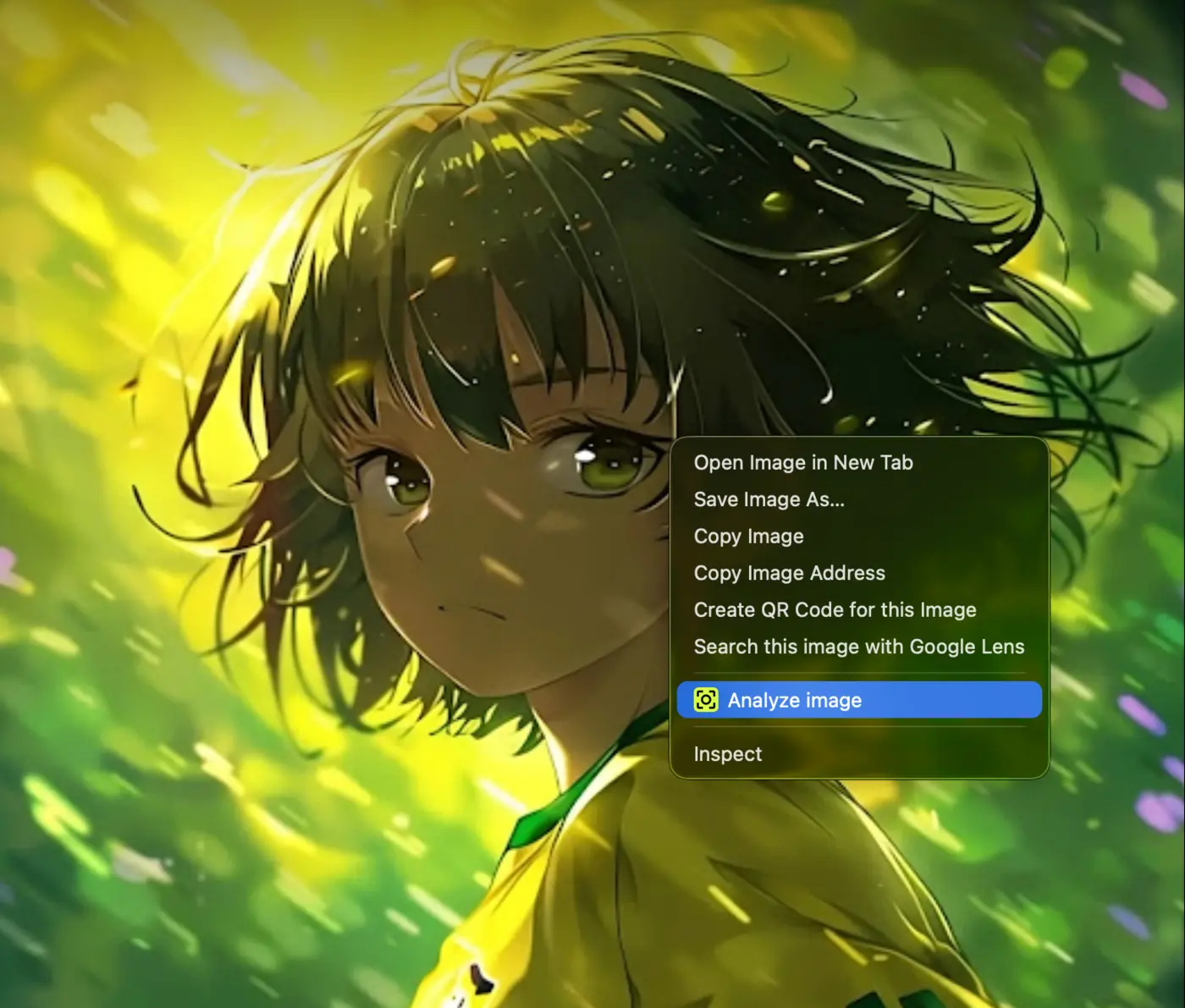
Analyze image command in the browser right-click menu
Analyze imageONE CLICK

Fastest way to start

Right-click any image. Choose Analyze image.

No downloads and no extra tabs. Open the browser menu directly on an image and Pixel2Prompt sends it to the extension sidebar for analysis.

01

Find an imageOn any supported web page

02

Right-clickSelect Analyze image

03

Get the resultPrompt, visible text, or both

One extension, the whole visual workflow

Everything Pixel2Prompt can do.

From the first capture to the saved result, every tool lives in the Chrome sidebar while you browse.

01

Image to Prompt

Turn a visual reference into a clear, detailed prompt for AI image generation.

02

Text from Images

Get editable text from screenshots, posters, thumbnails, infographics, covers, and slides.

03

Text from Screen Captures

Take a screenshot of anything shown on screen — including text visible in a paused playback or presentation slide — then extract it as editable text.

04

Capture Any Page Area

Draw around the exact part of the page you need — not the whole screen.

05

Prompt + Text Together

Receive a creative visual prompt and the words visible inside the same image.

06

Translate Results

Translate prompts and text into another language without rebuilding the result.

07

Custom Prompt Styles

Choose a detailed, short, structured, or custom way to describe an image.

08

History

Return to previous images, prompts, and text results whenever you need them again.

09

Credits

Use credits for visual analysis and add more to your balance when needed.

Capture anything you see

Prompt or text — you choose.

Not everything on the internet is easy to copy. Select a picture, a page section, or any screenshot — including one you took while watching something or viewing a slide — and turn it into something useful.

SELECTED PAGE AREA1280 × 720
Selected content in the Pixel2Prompt capture demoCAPTURE
PROMPT OUTPUT

Close-up editorial portrait, warm skin tones, dramatic light passing through blinds, polished gold detail, neutral studio background, high contrast photography.

Shape the result around your work

Describe. Translate. Save.

Choose the level of detail, move between languages, and keep a visual history you can return to.

01 / FORMAT

Describe images your way

Use the output style that fits the job.

01Detailed

Rich visual detail for recreating an image.

02Short

Fast ideas and simple creative direction.

03Structured

Organized output for repeatable workflows.

04Custom

Your own instructions and result style.

02 / TRANSLATE

Create once. Translate when needed.

Move prompts and visible text into another language with a clean, readable result.

03 / HISTORY

Save what you find. Reuse it later.

Previous images, prompts, and text results stay easy to recognize and copy again.

Translation without borders

18 languages. One visual workflow.

Translate prompts and recognized text directly in Pixel2Prompt — from English and Russian to Arabic, Hindi, Thai, and more.

Pixel2PromptPixel2PromptTRANSLATE / 18
ENEnglish
RUРусский
JA日本語
ZH中文
KO한국어
DEDeutsch
FRFrançais
ESEspañol
ITItaliano
PTPortuguês
NLNederlands
PLPolski
TRTürkçe
ARالعربية
HIहिन्दी
IDBahasa Indonesia
VITiếng Việt
THไทย

Your model. Your key. Your choice.

Connect your own AI and use Pixel2Prompt for free.

Choose OpenAI, Claude, Gemini, OpenRouter, or a custom provider and add your own API key. Pixel2Prompt credits are not used in this mode; your provider’s own pricing and limits may still apply.

MODEL SETTINGSFREE MODE
ProviderChoose your connection
Pixel2PromptCREDITS
OOpenAIOWN KEY
CClaudeOWN KEY
GGeminiOWN KEY
OROpenRouterOWN KEY
+CustomOWN KEY

Your key stays in your browser settings. Provider charges, if any, are billed by that provider.

Credits

Keep creating without breaking your flow.

Credits are only used with the built-in Pixel2Prompt provider. Connect your own supported AI provider to use the extension without Pixel2Prompt credit charges.

Top Up Credits
CREDITS BALANCE
24 credits
Ready for the next capture38%
Top Up Credits

Who is it for?

Useful wherever visual references matter.

01

AI Image Creators

Turn reference images into prompts ready for your next generation.

02

Designers

Study layout, color, lighting, type, and visual style from references.

03

Content Creators

Collect text and ideas from covers, posters, thumbnails, and screenshots.

04

Editors & Learners

Take a screenshot of text shown during playback or on a presentation slide, then turn it into editable notes.

05

Researchers

Turn screenshots and visual sources into notes you can copy and organize.

06

Product Teams

Save useful patterns from interfaces, landing pages, and product references.

Account-based analysis

Your balance and history stay connected to your account.

Sign in to use credits, analyze visuals, and return to saved results inside the extension.

Questions & answers

Everything you need to know.

Clear answers about captures, prompts, visible text, translation, history, and credits.

01What is Pixel2Prompt?

Pixel2Prompt is a Chrome extension that turns images, screenshots, and selected page areas into prompts or readable text.

02Does it only create prompts?

No. It can create a visual prompt, return the words visible inside the image, or provide both results together.

03How do I use it?

Right-click an image, upload a file, paste an image URL, or capture an area of the page. The result appears in the extension sidebar.

04Can I get text shown during playback or in a slide?

Yes. Take a screenshot while the text is visible, then upload it or capture the screenshot area with Pixel2Prompt. The extension analyzes the image, not the video itself.

05Can I capture text that will not select normally?

If the words are visible on your screen, capture that area and Pixel2Prompt can return editable text.

06Can I translate the result?

Yes. You can translate both prompts and text results into another language.

07Can I choose how the prompt is written?

Yes. Choose detailed, short, structured, or custom output depending on your workflow.

08Do I need credits?

Only when you use the built-in Pixel2Prompt provider. Connect a supported AI with your own API key and Pixel2Prompt will not charge credits; your provider may apply its own pricing.

Ready when you are

Turn what you see into prompts or text.

Install Pixel2Prompt for Chrome and keep useful prompts, text, translations, and visual references one click away.